


[2025] UiPath-TAEPv1 Dumps are Available for Instant Access
Valid UiPath-TAEPv1 Dumps for Helping Passing UiPath-TAEPv1 Exam!
NEW QUESTION # 44
What is a primary distinction between manual and automated test execution in UiPath Test Manager?
- A. Automated test executions can be performed only in UiPath Orchestrator, while manual executions can only be performed in UiPath Test Manager.
- B. Manual executions are done for test sets created in UiPath Test Manager or linked from Orchestrator with manual steps, while automated executions are invoked through Orchestrator for test cases linked from Studio.
- C. Manual and automated test executions do not have specific distinctions and can be executed interchangeably.
- D. Manual executions require user interaction for each test step, while automated executions are self-running without any manual intervention.
Answer: D
Explanation:
The primary distinction is that manual executions require user interaction for each test step, making them suitable for scenarios like exploratory testing or steps requiring human validation. In contrast, automated executions are fully self-running, executed via Orchestrator without manual involvement.
NEW QUESTION # 45
What does the Run All in View action in the Test Explorer panel do?
- A. It runs only failed test cases.
- B. It runs only selected test cases and workflows.
- C. It runs all test cases and workflows.
- D. It runs tests that are currently in view through all filters.
Answer: D
Explanation:
The Run All in View action in the Test Explorer panel executes all test cases currently visible after applying filters or folder selections. This allows users to target specific subsets of test cases without manually selecting each one.
NEW QUESTION # 46
Which activity enables retrieving random data from a defined set of test data?
- A. Random Text
- B. Random Range
- C. Random String
- D. Random Value
Answer: D
Explanation:
The Random Value activity enables retrieving random data from a defined set of test data. It can be used to generate random values based on the specified data set, which is useful in data-driven testing scenarios.
NEW QUESTION # 47
What happens to the arguments when creating a test case from a workflow?
- A. Arguments from the workflow are deleted and must be redefined.
- B. Arguments from the workflow are transformed into variables in the test case.
- C. Arguments from the workflow need to be manually imported into the test case.
- D. Arguments from the workflow are automatically imported into the test case.
Answer: D
Explanation:
When creating a test case from a workflow in UiPath Studio, the arguments from the workflow are automatically imported into the test case. This allows the test case to simulate the input/output behavior of the original workflow without needing to redefine the arguments.
NEW QUESTION # 48
How can the test data queue items be uploaded to a queue?
- A. Directly in Orchestrator or through Studio.
- B. Only through Studio.
- C. Directly in Orchestrator or through Test manager.
- D. Only through Orchestrator.
Answer: A
Explanation:
The test data queue items can be uploaded directly in Orchestrator or through Studio. These two platforms allow users to manage and upload test data to the test data queue, enabling integration and execution of data-driven tests.
NEW QUESTION # 49
How can a Serverless Robot be added to an Orchestrator tenant?
- A. Go to Tenant > Machines. Click Add Machine and select Cloud Robot - Serverless. Fill in the Name and optionally the Description. Add tags if necessary and configure other settings. Finally, click Provision.
- B. Go to Tenant > Robots. Click Add Robot and select Serverless Robot. Fill in the Name and optionally the Description. Add tags if necessary and configure other settings. Finally, click Add Robot.
- C. Go to Tenant > Machines. Click Add Machine and select Cloud Robot - Serverless. Fill in the Name and optionally the Description. Add tags if necessary, but don't configure other settings. Finally, click Save.
- D. Go to Tenant > Robots. Click Add Robot and select Serverless. Fill in the Name and optionally the Description. Add tags if necessary and configure other settings. Finally, click Provision.
Answer: C
Explanation:
To add a Serverless Robot in Orchestrator, navigate to Tenant > Machines, click Add Machine, and select Cloud Robot - Serverless. Then, fill in the Name (and optionally Description), add any necessary tags, and click Save. No additional configuration is required.
NEW QUESTION # 50
Who can edit or delete projects in Test Manager?
- A. Only the Project Owners
- B. Project Owners and Administrators
- C. Only the Administrators
- D. Any user role
Answer: B
Explanation:
In UiPath Test Manager, only Project Owners and Administrators have the necessary permissions to edit or delete projects. This ensures proper access control and prevents unauthorized modifications.
NEW QUESTION # 51
What is application testing in the context of UiPath?
- A. An application testing creates test cases that verify RPA workflow outputs.
- B. An application testing works with large data sets to verify workflow execution and covers corer cases.
- C. An application testing invokes different test frameworks and retrieves the results.
- D. An application testing executes an RPA process and verifies the results.
Answer: D
Explanation:
In the context of UiPath, application testing refers to executing an RPA process and verifying the results to ensure that the application or workflow behaves as expected under various conditions.
NEW QUESTION # 52
What is the purpose of UiPath Test Manager Hub?
- A. Integration between UiPath Test Suite and third-party ALM tools.
- B. Management of the testing process.
- C. Test execution in a scheduled manner or build-driven through a CI/CD pipeline.
- D. Reporting and dashboards for test results.
Answer: A
Explanation:
The UiPath Test Manager Hub acts as the integration point between UiPath Test Suite and third-party ALM tools (like Jira, Azure DevOps). It enables synchronization of requirements, defects, test results, and assignments, supporting seamless lifecycle management.
NEW QUESTION # 53
How to document a test case using Task Capture?
- A. 1. Open the project in Test Manager
2. Open a test case in Test Manager that should be documented
3. Open the Manual Steps tab
4. Click Document with Task Capture
5. Stat capture the test steps based on the test case description - B. 1. Open the project in Test Manager
2. Open the Test Requirement tab
3. Open a test case in Test Manager that should be documented
4. Click Document with Task Capture
5. Start capturing the test steps based on the test case description - C. 1. Open the project in Test Manager
2. Open a test case in Test Manager that should be documented
3. Open the Test Requirement tab
4. Open the Manual Steps tab
5. Stat capture the test steps based on the test case description - D. 1. Open the project in Test Manager
2. Open the Test Requirement tab
3. Open the Manual Steps tab
4. Click Document with Task Capture
5. Stat capture the test steps based on the test case description
Answer: A
Explanation:
To document a test case using Task Capture, you need to:
Open the project in Test Manager
Open the specific test case to be documented
Navigate to the Manual Steps tab
Click Document with Task Capture
Start capturing the test steps based on the test case description
This process ensures that manual test steps are accurately captured and linked to the test case for better traceability and clarity.
NEW QUESTION # 54
What is the purpose of the 'Verify Expression' activity in the UiPath.Testing.Activities package of UiPath?
- A. It verifies if a given expression falls within a specific range.
- B. It verifies an expression by comparing it with another expression using a defined operation.
- C. It verifies and asserts the output of a specific activity.
- D. It verifies the truth value of a given expression.
Answer: D
Explanation:
The 'Verify Expression' activity in the UiPath.Testing.Activities package is used to evaluate the truth value of a given VB expression. If the expression evaluates to True, the test continues; if False, it results in a failed assertion.
NEW QUESTION # 55
Having the test case described in the image below: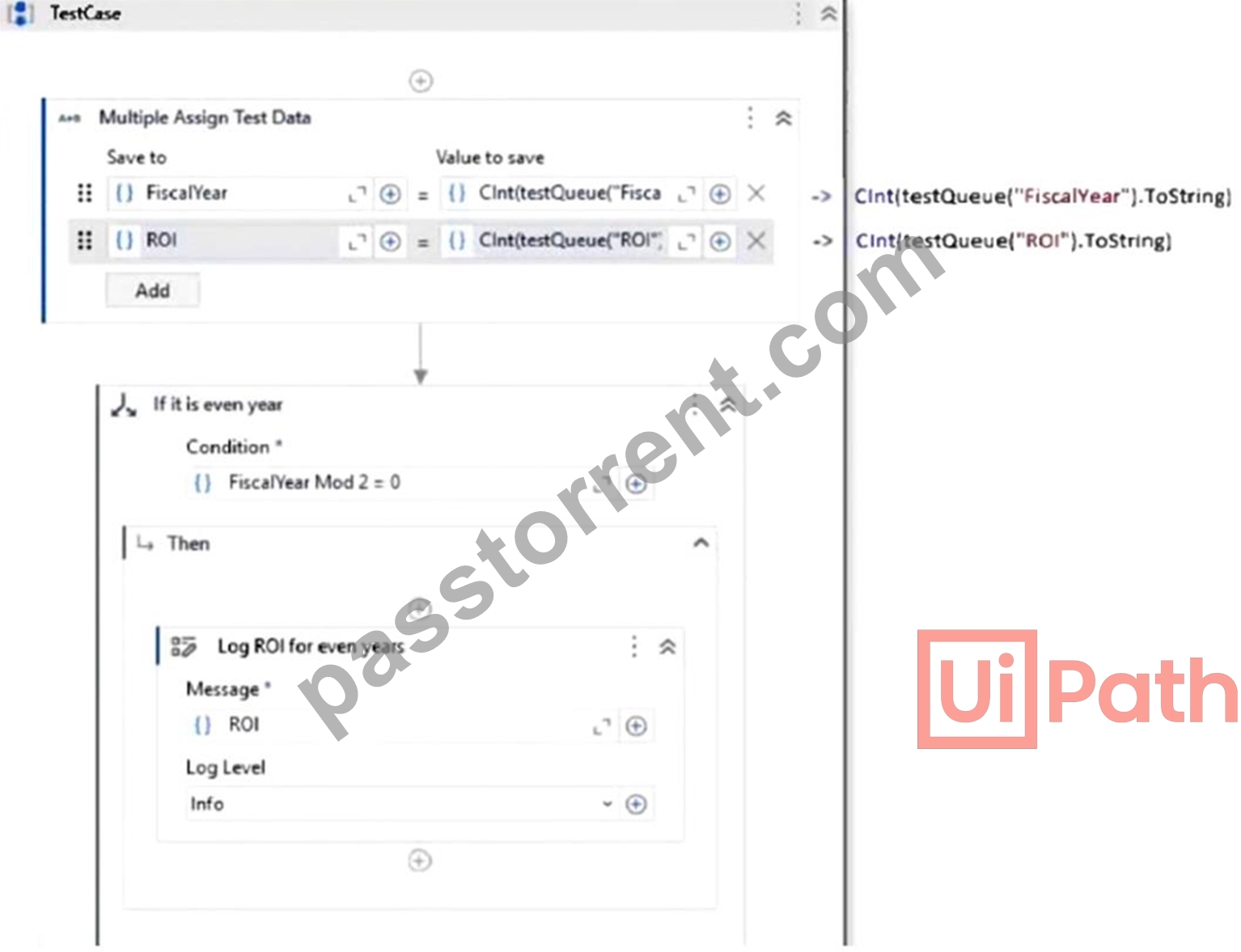
The test data queue was imported in Studio workflow through a variable called testQueue. The structure of the Test Data Queue can be seen below: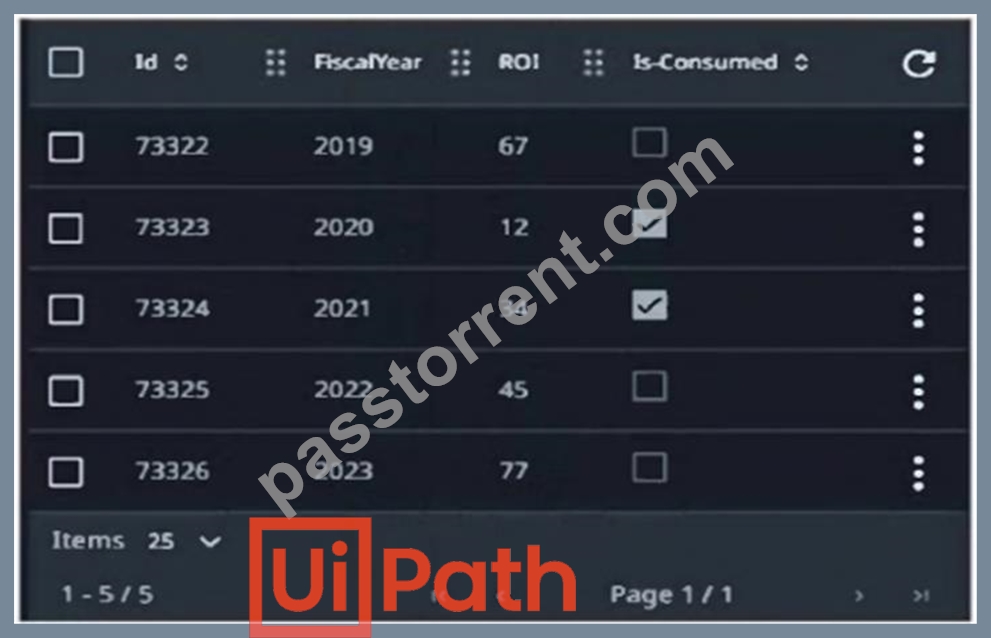
What ROI will be printed in the Output panel when the test case from the Text Explorer panel is run?
- A. 12.45
- B. 67,34,77
- C. 0
- D. 67,77
Answer: C
Explanation:
The logic in the test case checks whether FiscalYear Mod 2 = 0 (i.e., even years). If true, it logs the corresponding ROI. Only FiscalYear 2022 is even and not marked as consumed, so it will be used.
NEW QUESTION # 56
What factors influence the calculation of coverage in the Descriptor Coverage feature in UiPath?
- A. The number of selectors that have been manually verified.
- B. The total number of selectors in a test case execution.
- C. The total number of selectors available in the Object Repository.
- D. The number of times a selector has been successfully executed.
Answer: D
Explanation:
In Descriptor Coverage, the calculation is influenced by the number of times a selector has been successfully executed during test case runs. It helps evaluate how thoroughly the UI elements defined in the Object Repository are being tested.
NEW QUESTION # 57
Which component of the UiPath Test Suite communicates directly with CI/CD pipelines?
- A. UiPath Action Center
- B. UiPath Orchestrator
- C. UiPath Test Manager
- D. UiPath Studio
Answer: B
Explanation:
UiPath Orchestrator is the component that communicates directly with CI/CD pipelines. It manages the execution of test cases and workflows triggered from CI/CD tools, enabling automated and continuous testing as part of the deployment process.
NEW QUESTION # 58
Given the following SumWorkflow: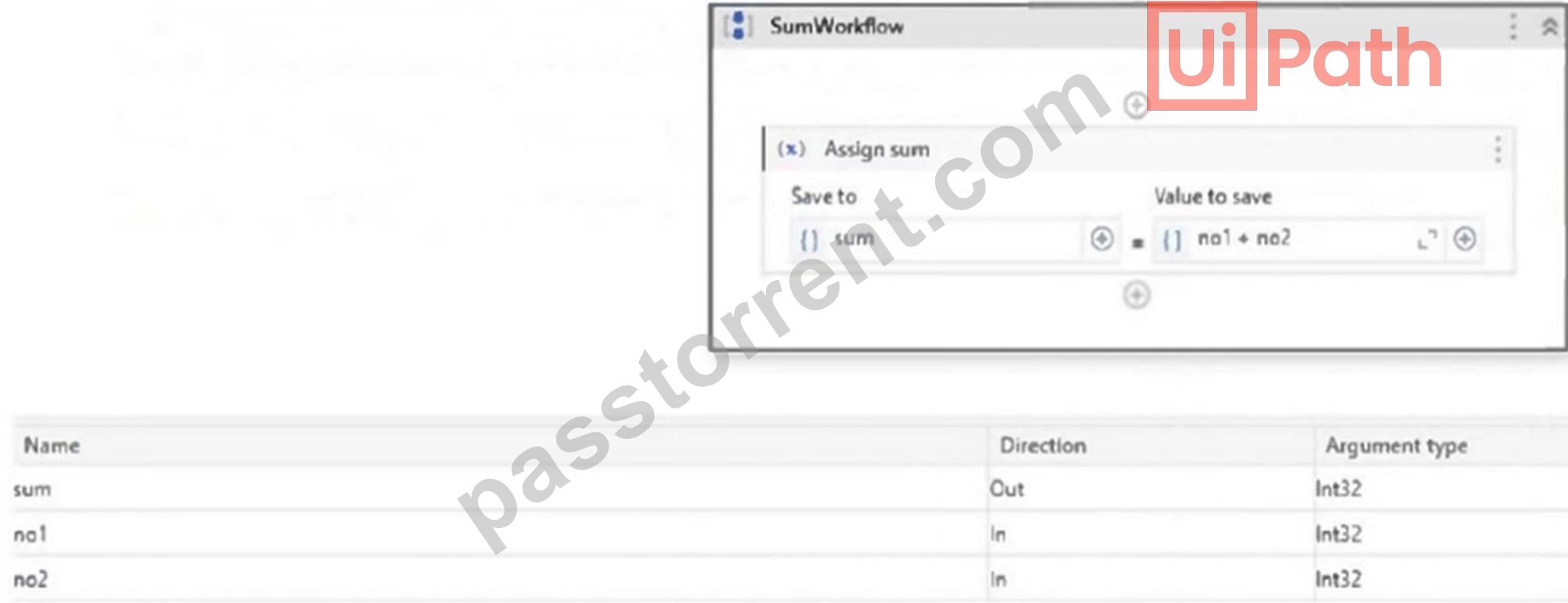
What is the appropriate verification required for testing that the SumWorkflow works as expected?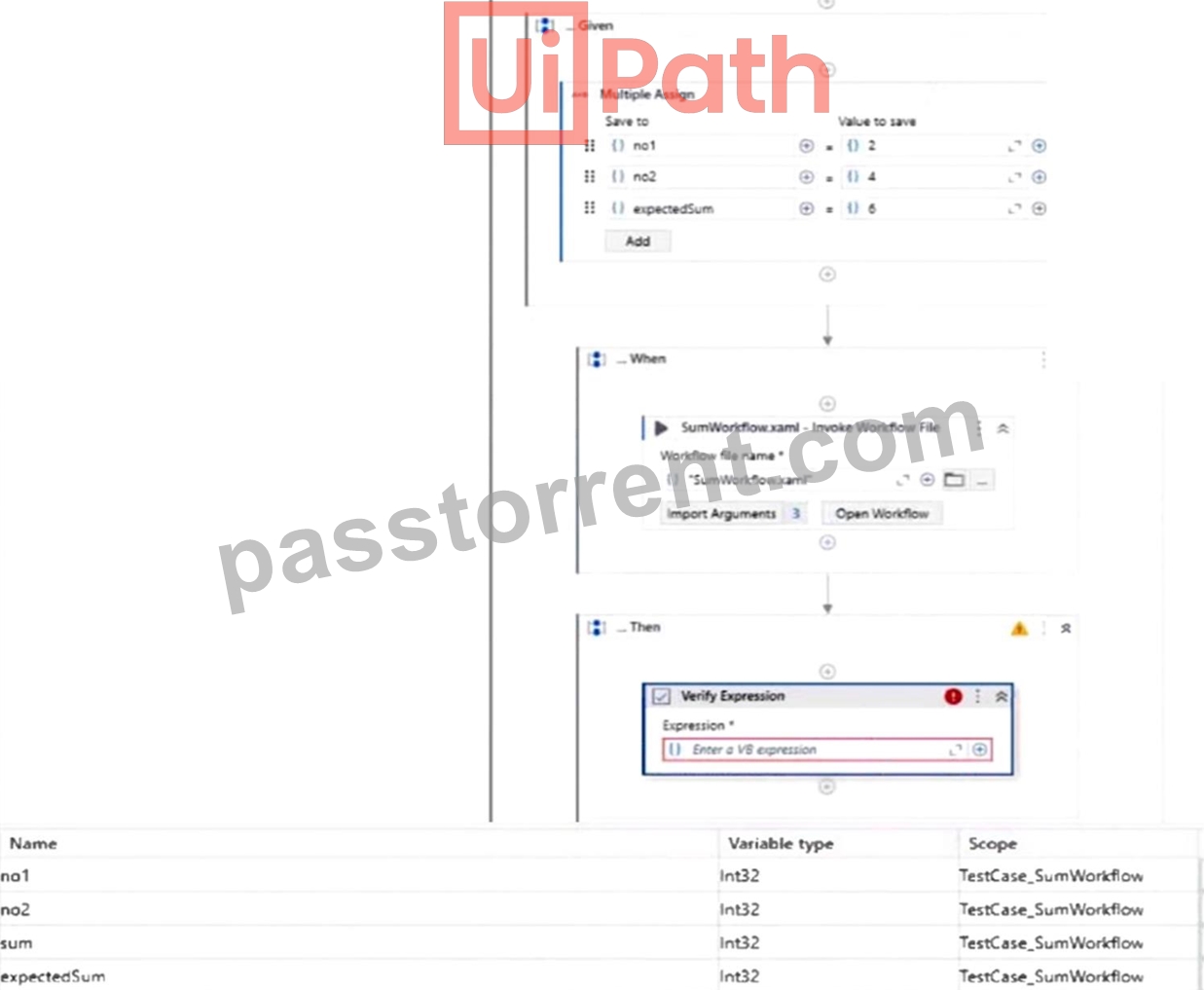
- A. sum.Equals(expectedSum)
- B. "sum = expectedSum"
- C. no1 + no2 = expectedSum
- D. sum
Answer: B
Explanation:
The correct VB expression to verify that the SumWorkflow executed correctly is sum = expectedSum. This compares the actual output (sum) with the expected value (expectedSum) set earlier in the test case. If they match, the workflow performs as intended.
NEW QUESTION # 59
......
UiPath UiPath-TAEPv1 Exam Syllabus Topics:
| Topic | Details |
|---|---|
| Topic 1 |
|
| Topic 2 |
|
| Topic 3 |
|
| Topic 4 |
|
| Topic 5 |
|
| Topic 6 |
|
| Topic 7 |
|
| Topic 8 |
|
Updated UiPath-TAEPv1 Dumps Questions For UiPath Exam: https://www.passtorrent.com/UiPath-TAEPv1-latest-torrent.html
UPDATED UiPath UiPath-TAEPv1 Exam Questions & Answer: https://drive.google.com/open?id=1xMxsR5h5VEqg5x8FRoe2be95S2lgL-c7