


Free MB-820 braindumps download (MB-820 exam dumps Free Updated Mar 24, 2026)
MB-820 Dumps for Pass Guaranteed - Pass MB-820 Exam 2026
NEW QUESTION # 59
You need to write the code to call the subcontractor's REST API.
How should you complete the code segment? To answer, select the appropriate options in the answer area.
NOTE: Each correct selection is worth one point.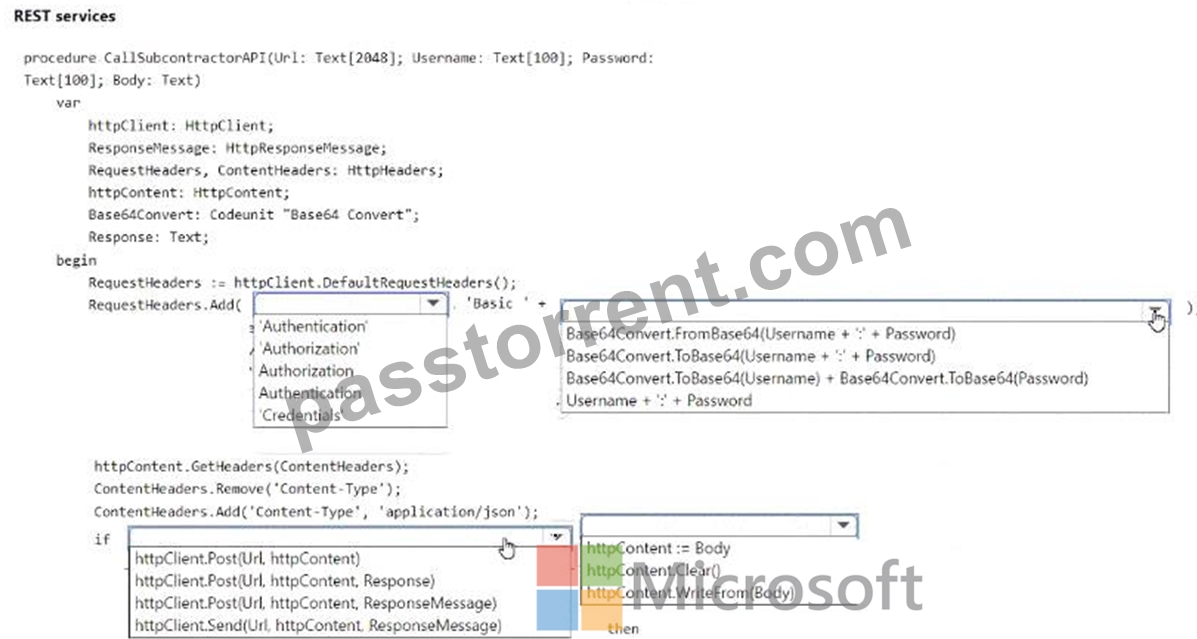
Answer:
Explanation: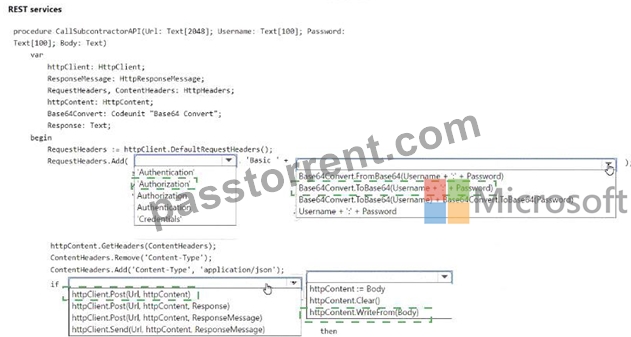
Explanation:
To correctly write the code to call the subcontractor's REST API, you would need to set the Authorization header with the base64 encoded username and password for basic authentication. The code segment indicates the use of the Base64Convert codeunit to convert the username and password to base64 format, which is then prefixed with "Basic " to form the proper Authorization header value.
The correct method to add the Authorization header to the RequestHeaders would be:
RequestHeaders.Add('Authorization', 'Basic ' + Base64Convert.ToBase64(Username + ':' + Password)); And the correct method to set the httpContent with the body of the request would be:
httpContent.WriteFrom(Body);
These are the necessary steps to form a well-structured HTTP request for basic authentication and to include the body of the request in the API call.
NEW QUESTION # 60
You plan to call a web service by using the data type HttpClient from a Business Central AL extension You must provide the following implementation for the web service call:
* The web service must authenticate the client with a certificate.
* The certificate must include a password.
* The password must be hidden when you debug the code
You need to include the certificate in the web service call. Which instruction should you use?
- A. HttpClient.AddCertificate{Certifkate: SecretText, Password: SecretText);
- B. Httpclient.Addertifieate(certificate: Text, Password: Text);
- C. HttpClient.AddCertificate{Password: SecreTiext);
- D. Httpclient.Addeertifieate(Certifieate: Blob, Password: secretText);
Answer: A
Explanation:
ou plan to call a web service using HttpClient from a Business Central AL extension. The web service must authenticate using a certificate that includes a password, and the password must be hidden during debugging.
Options
The question asks for the correct implementation where the certificate and password are provided and where the password is hidden when debugging.
SecretText is a special data type in Business Central that hides sensitive data (like passwords) during debugging.
NEW QUESTION # 61
You need to create the code related to the Subcontract Documents table to meet the requirement for the quality department.
How should you complete the code segment? To answer, select the appropriate options in the answer area.
NOTE: Each correct selection is worth one point.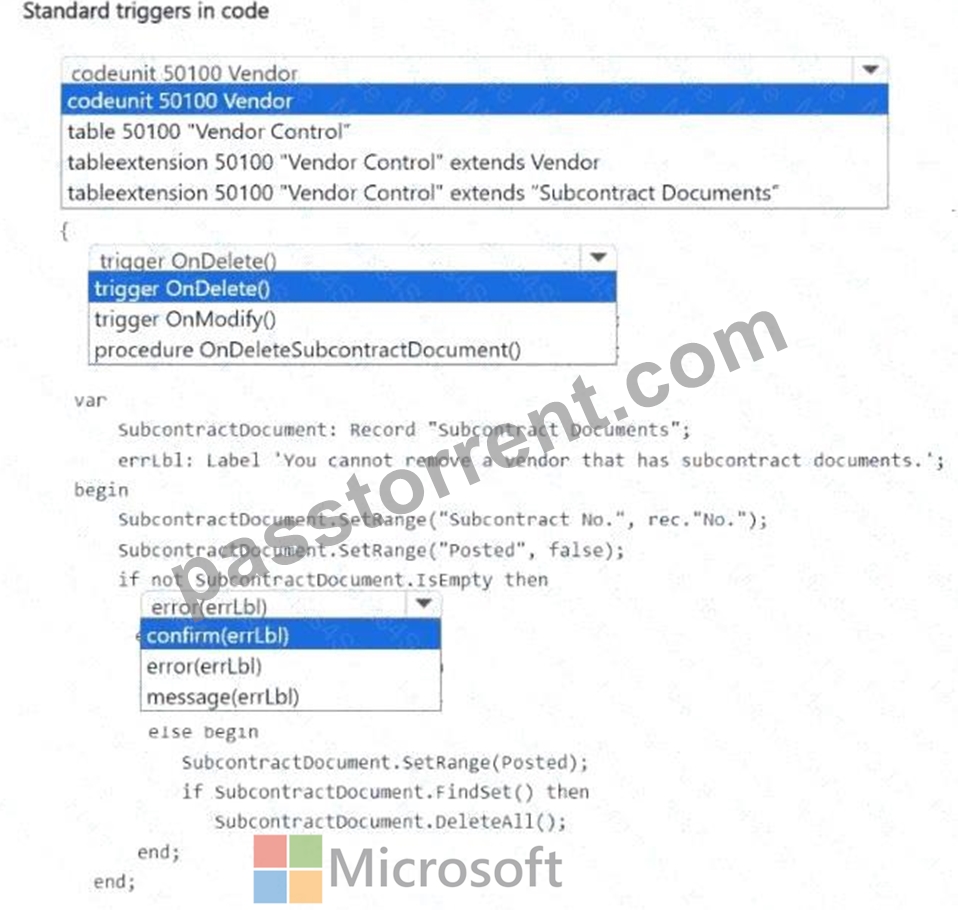
Answer:
Explanation: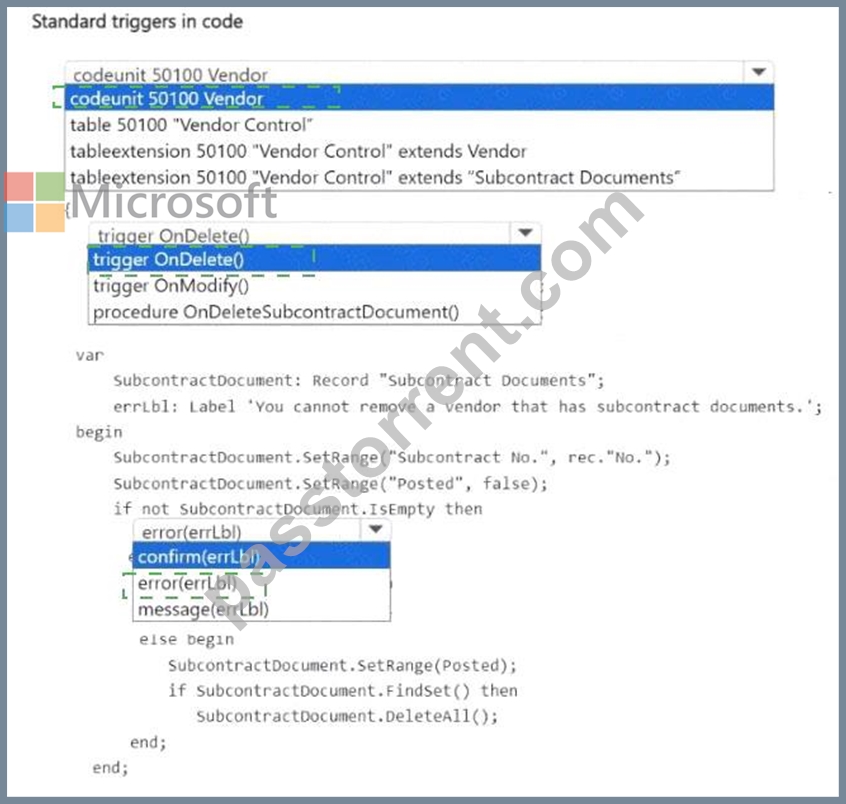
Explanation: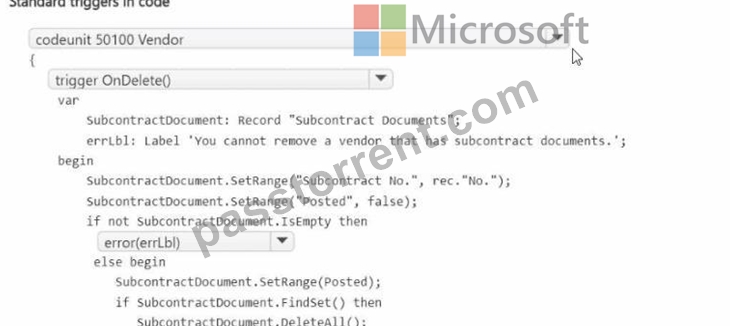
NEW QUESTION # 62
You need to create the Fabrikam Vendor API for the accounting department.
How should you complete the code segment? To answer, select the appropriate options in the answer area.
NOTE: Each correct selection is worth one point.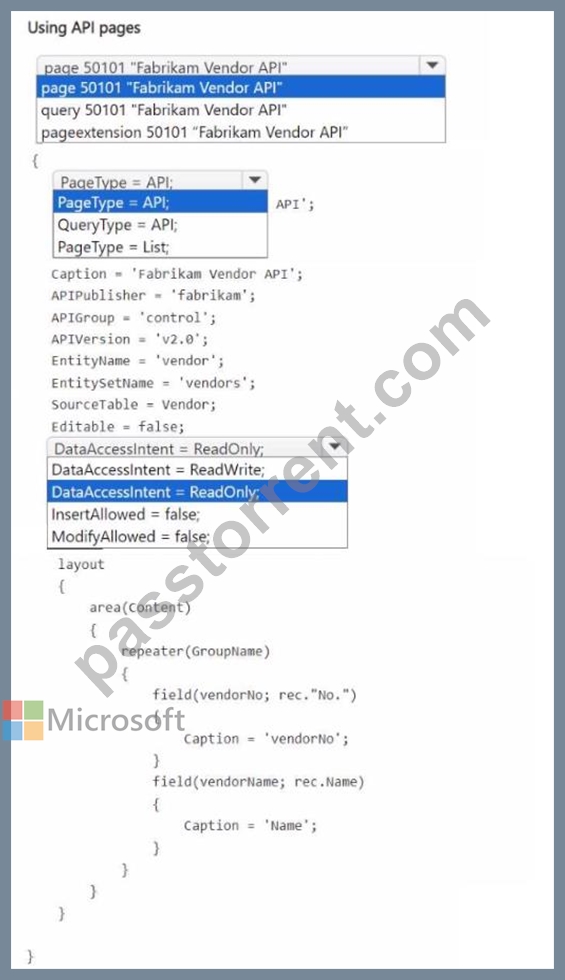
Answer:
Explanation: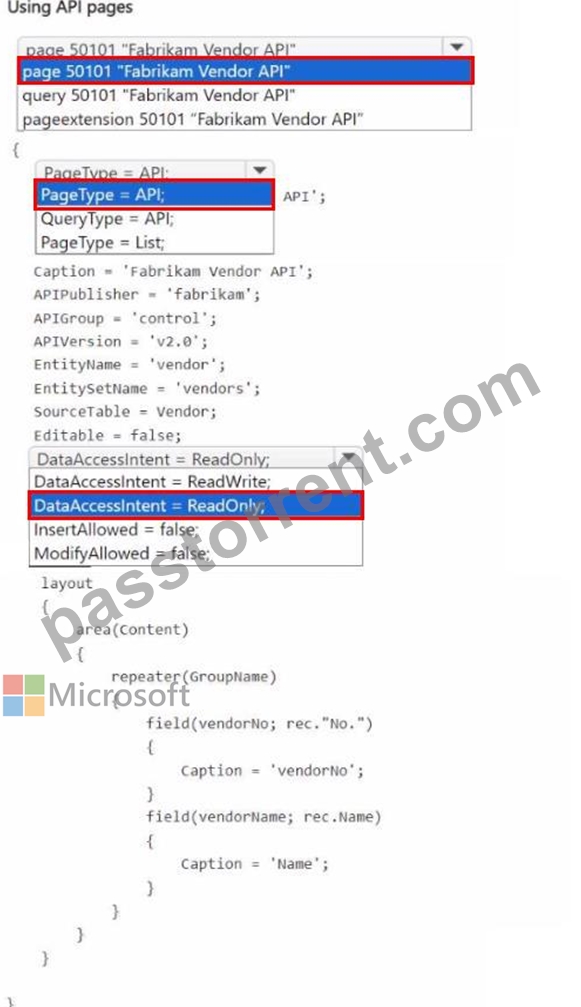
NEW QUESTION # 63
You need to write an Upgrade codeunit and use the DataTransfer object to handle the data upgrade.
Which solution should you use for each requirement? To answer, select the appropriate options in the answer area.
NOTE: Each correct selection is worth one point.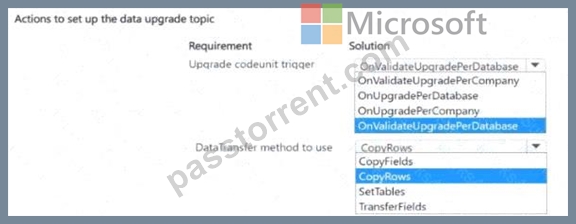
Answer:
Explanation: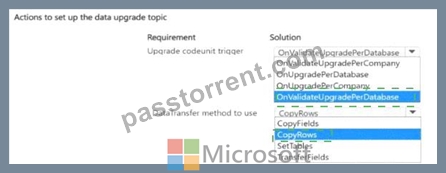
Explanation: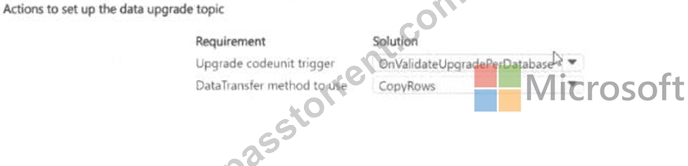
Upgrade codeunit trigger: OnValidateUpgradePerDatabase
* Since the question specifies that you are handling data upgrades, and you need to use validation before upgrading at the database level, the correct choice is OnValidateUpgradePerDatabase. This method ensures that the upgrade process is validated before applying to the entire database, making it more efficient when data affects multiple companies or structures.
DataTransfer method to use: CopyRows
* CopyRows is the appropriate method when you are handling large data transfers between tables, especially in an upgrade scenario where you are migrating or transferring data from one table to another. It copies entire rows of data and is optimal for bulk data operations during upgrades.
NEW QUESTION # 64
You create the following Vendor table and Item table in Business Central.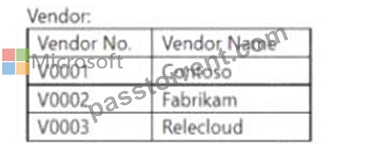
You require the following data set to assign vendors to items.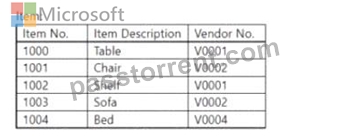
You need to create a query to assign the vendors.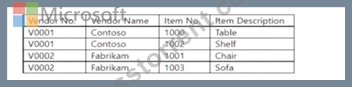
Which three code blocks should you use to develop the solution? To answer, move the appropriate code blocks from the list of code blocks to the answer area and arrange them in the correct order.
NOTE: More than one order of answer choices is correct. You will receive credit for any of the correct orders you select.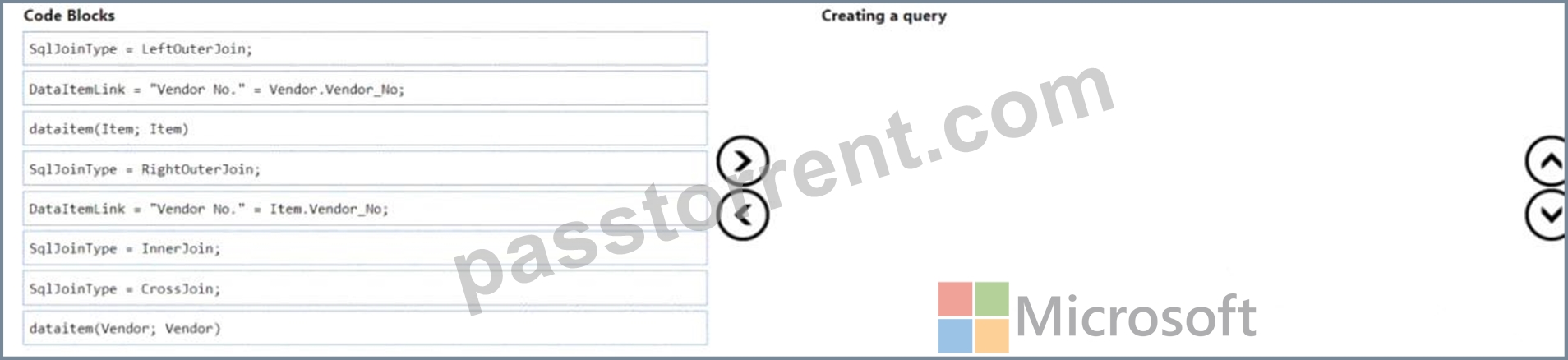
Answer:
Explanation: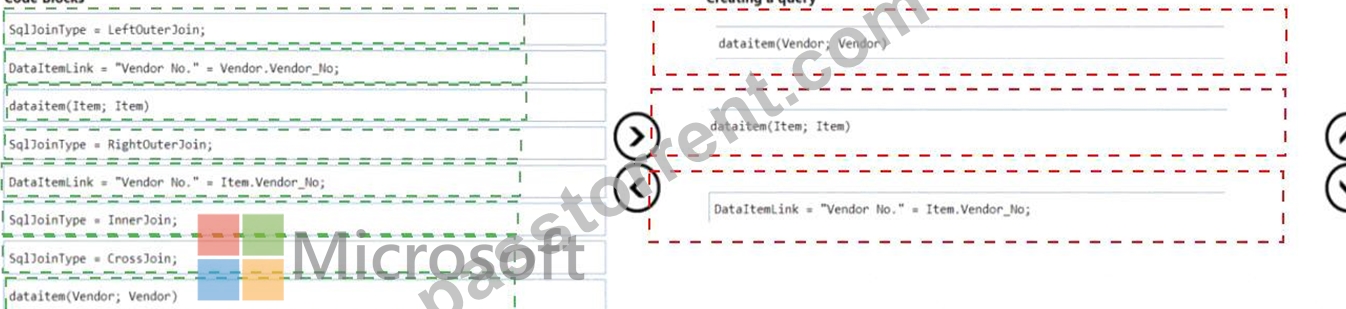
Explanation:
To create a query that assigns vendors to items in Business Central, use the following code blocks in sequence:
* dataitem(Vendor; Vendor)
* dataitem(Item; Item)
* DataItemLink = "Vendor No." = Item.Vendor_No;
Creating a query:In Business Central, a query object is used to combine data from multiple tables. You start by specifying each table as a data item. In this case, you would start with the Vendor table and then the Item table. After specifying the data items, you need to link them together. The DataItemLink property is used to establish a relationship between two data items based on a common field. Here, you are linking the Vendor and Item tables on the "Vendor No." field, which is present in both tables. This link ensures that the query will return a dataset that includes related records from both tables based on the vendor number. The order of the code blocks ensures the logical flow and relationships between tables as required for the query.
NEW QUESTION # 65
You create a Business Central report.
You need to insert values on the Request page to be saved for the next time the report is run.
What should you do?
- A. Set the SaveValues property to true.
- B. Set the UseRequestPage property to true.
- C. Declare a 'SaveValues' variable and assign it to true on the OnOpenPage() trigger.
- D. Set the TransactionType property to Update.
Answer: C
Explanation:
To ensure that the values inserted on the Request page of a Business Central report are saved for the next time the report is run, the SaveValues property (D) should be set to true. This property is available on the Request page of the report and, when set to true, allows the system to remember the values entered by the user, so they do not have to re-enter them each time they run the report. This feature enhances user experience by reducing repetitive data entry and ensuring consistency in report parameters across multiple executions. The other options mentioned, such as setting the Transaction Type property to Update (A) or declaring a Savevalues variable in the OnOpenPage trigger (B), are not directly related to saving user input on a report's Request page.
NEW QUESTION # 66
You need to define the data types for the fields of the N on-conformity table.
Which two data types should you use? Each correct answer presents part of the solution.
NOTE: Each correct selection is worth one point.
- A. Date for the Non-Conformity Date field
- B. Date Time for the Non-Conformity Date field
- C. Char for the Non-Conformity Number field
- D. Integer for the N on-conformity Number field
- E. Code for the Non-Conformity Number field
Answer: C,E
NEW QUESTION # 67
You have an XMLport that exports items from a database to an XML file.
You need to change the export format from XML to CSV.
What should you do?
- A. Change the Direction property to Both
- B. Change the XmlVeisionNo property to 1.1.
- C. Change the Format property to VariableText.
- D. Change the FormatEvaluate property to Legacy.
- E. Fill the FileName property with the Items.csv value.
Answer: C
Explanation:
* XMLport Overview
In Microsoft Dynamics 365 Business Central, XMLports are used for importing and exporting data in XML, CSV, or other text formats. By default, XMLports are designed to work with XML data, but they can also handle delimited text formats like CSV (Comma-Separated Values).
* Requirement Clarification
The requirement is to change the export format from XML to CSV. CSV is a text-based format, not an XML format. To accommodate this, you need to change how the XMLport handles data during export.
* Properties of XMLport
The Format property in XMLports controls whether the output format is XML or a text-based format such as CSV.
The VariableText option of the Format property specifies that the data should be exported in a variable text format, like CSV.
The XMLports default to an XML format, but by setting the Format property to VariableText, you can change the export to CSV format or another text-delimited format.
* Explanation of Correct Answer (E)
To switch from XML to CSV export:
You need to change the Format property of the XMLport to VariableText.
The VariableText option allows for the export of data in a non-XML format, which is precisely what CSV represents (a comma-delimited text file).
* Why Other Options Are Incorrect
Option A (Change the Direction property to Both):
The Direction property controls whether the XMLport is used for Import, Export, or Both (import and export), but it does not affect the file format (XML vs. CSV). Hence, this is irrelevant to the file format change.
Option B (Change the FormatEvaluate property to Legacy):
The FormatEvaluate property is not related to changing the export format. It deals with the evaluation of the data format during the processing but doesn't change the format type (XML or CSV).
Option C (Change the XmlVeisionNo property to 1.1):
The XmlVersionNo property defines the XML version used for the export (such as 1.0 or 1.1). This only applies to XML exports and does not change the format to CSV.
Option D (Fill the FileName property with Items.csv):
While this option would specify the name of the file being exported (i.e., "Items.csv"), it doesn't control the format of the export itself. The actual format change is controlled by the Format property.
* Developer Reference from Microsoft Documentation
According to the official Microsoft documentation for XMLports in Business Central, the Format property is critical for determining how data is structured for export. To change the file format from XML to CSV, developers need to set the Format property to VariableText. This allows for export in a text-delimited format, which is ideal for CSV.
XMLport Properties - Format Property
How to: Export Data in Text Format Using XMLports
NEW QUESTION # 68
Why is it important to adhere to development standards in Business Central?
- A. To ensure code quality and maintainability
- B. To decrease the software license costs
- C. To allow for higher data storage capacity
- D. To increase the number of users that can be supported
Answer: A
NEW QUESTION # 69
You have an app with the Application Insights 1 connection string specified in app.json.
You create the following custom telemetry event in the app.
You publish the app to a customer environment that has a specified Application Insights 2 connection string.
The customer does not want the event to be displayed in Application Insights 2.
You need to ensure the event is displayed only in Application Insights 1.
What should you fix to achieve the goal?
- A. Remove the Application Insights 1 connection string from the app.json file of the app.
- B. Change the TelemetryScope parameter to extensionpublisher.
- C. Change the Verbosity parameter to Normal.
- D. Remove the Application Insights 2 connection string from the customer environment.
Answer: B
NEW QUESTION # 70
You need to access the RoomsAPI API from the canvas app.
What should you do?
- A. Include in the extension a codeunit of type Install that publishes RoomsAPI.
- B. Open the Web Services page and publish the RoomsAPI page as a web service.
- C. Use the default API configuration in Business Central
- D. Enable the APIs for the Business Central online environment.
Answer: B
Explanation:
API Publishing for Extensions:
In Business Central, when creating custom APIs like RoomsAPI, it is important to ensure that they are automatically published during the installation or upgrade of the extension.
To achieve this, you can include a codeunit of type Install in the extension that explicitly publishes the custom API (RoomsAPI) as a web service. This ensures that it is available for use immediately after the extension is deployed without requiring manual intervention.
Codeunit Type:
A codeunit of type Install runs when the extension is installed or upgraded. This type of codeunit can be used to perform setup tasks such as publishing web services or APIs like RoomsAPI.
Why Not Other Options?
Option A (default API configuration): This would not automatically publish the RoomsAPI. Default APIs do not cover custom APIs.
Option B (enable APIs for the environment): Enabling APIs in Business Central allows the standard APIs to be used, but custom APIs still need to be manually published.
Option C (publish via Web Services page): This would work but requires manual intervention to publish RoomsAPI, which does not fulfill the requirement of automatic publishing during installation.
Reference Documentation:
Publishing APIs in Extensions
Codeunit Types in Business Central
NEW QUESTION # 71
You plan to run a debug for a client.
You extend the Standard Sales - Invoice report to add a new requirement.
You create a Report Extension 'Ext Standard Sales - Invoice' with ID = 50100 and add the following lines of code. (Line numbers are included for reference only.)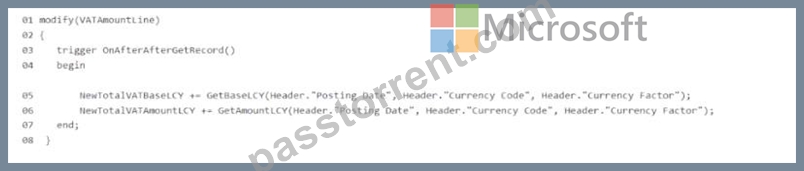
The client informs you that the value of the New Total VATBaseLCY column is incorrect.
You need to run a debug to identify the cause.
Which four actions should you perform in sequence? To answer, move the appropriate actions from the list of actions to the answer area and arrange them in the correct order.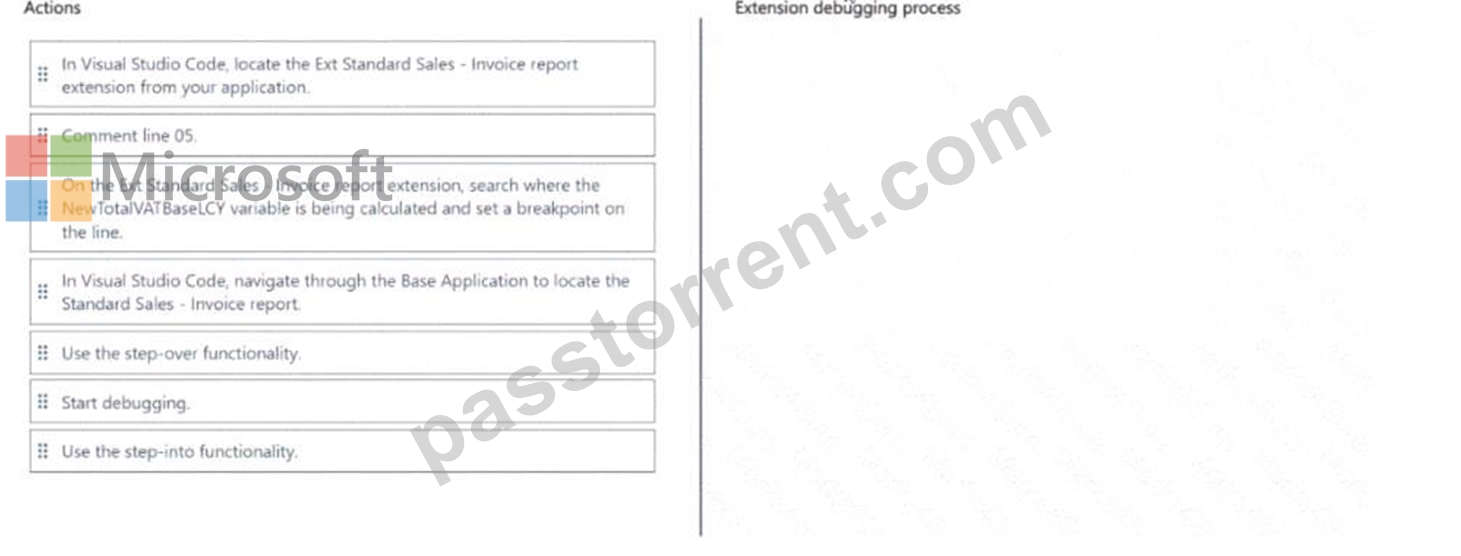
Answer:
Explanation: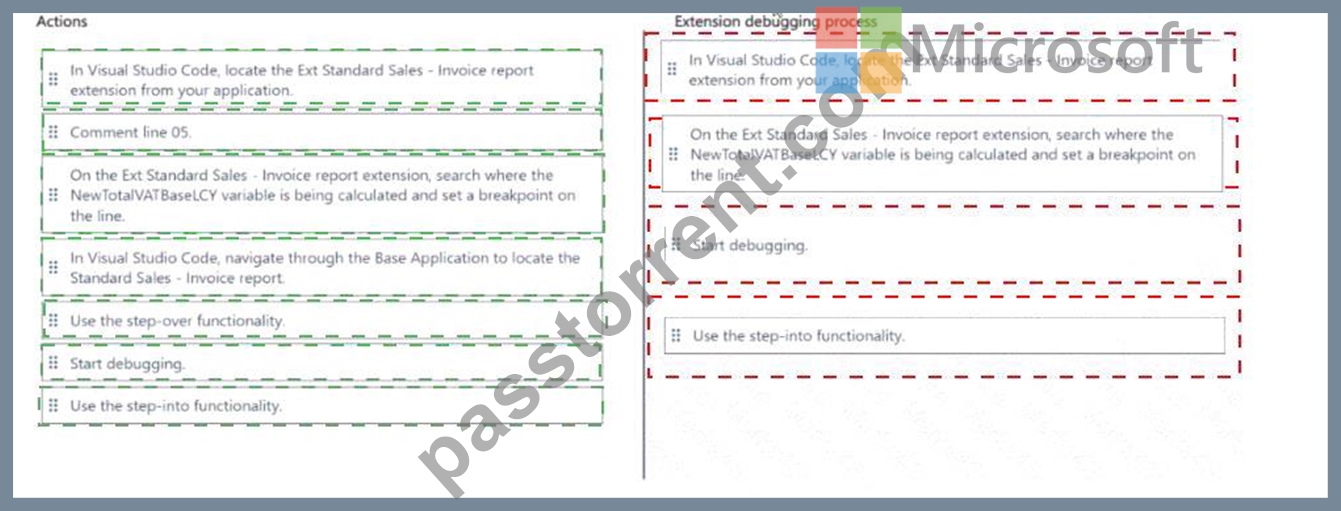
Explanation:
Here's the process to follow in the correct sequence:
* In Visual Studio Code, locate the Ext Standard Sales - Invoice report extension from your application.
* The first step is to locate the specific extension you're working with so you can modify or inspect its code.
* Search where the NewTotalVATBaseLCY variable is being calculated and set a breakpoint on the line.
* To debug the issue, you need to place a breakpoint on the line where the NewTotalVATBaseLCY is calculated.
* Start debugging.
* Once the breakpoint is set, you begin the debugging process to examine the values and code execution.
* Use the step-over functionality.
* After starting the debugging, you will use the step-over functionality to move through the code line by line and observe the values of the variables.
NEW QUESTION # 72
A company plans to optimize its permission sets.
The company has the following permission sets:
You need to provide the following implementation for a third permission set:
* Create a new Permission Set C that is a composite of Permission Set A and Permission Set B.
* Assign Permission Set C to a user.
You need to ensure that the user has only read access to the Job table.
Solution: Set the IncludedPermissionSets property to Permission Set A.
Does the solution meet the goal?
- A. Yes
- B. No
Answer: A
NEW QUESTION # 73
You need to access the RoomsAPI API from the canvas app.
What should you do?
- A. Include in the extension a codeunit of type Install that publishes RoomsAPI.
- B. Open the Web Services page and publish the RoomsAPI page as a web service.
- C. Use the default API configuration in Business Central
- D. Enable the APIs for the Business Central online environment.
Answer: B
NEW QUESTION # 74
A company plans to meet new regulatory requirements.
The regulator has issued new tax tiers.
You need to update the base application table by using a table extension.
Which table field property can you change?
- A. BlankZero
- B. CalcFormula
- C. DecimalPlaces
- D. AutoFormatType
Answer: C
Explanation:
When updating the base application table using a table extension in Microsoft Dynamics 365 Business Central, certain properties of table fields can be modified to meet new requirements, such as regulatory changes. The DecimalPlaces property (B) is one such property that can be adjusted in a table extension. This property determines the number of decimal places that are displayed and stored for decimal fields in the table.
Adjusting the DecimalPlaces property can be particularly useful when dealing with financial data and tax calculations that require precision to meet new tax tiers set by a regulator. It's important to note that not all properties can be modified in a table extension; for example, the CalcFormula property (A) cannot be changed as it affects how the field's value is calculated, which could have significant implications on the base application's logic.
NEW QUESTION # 75
......
Microsoft MB-820 Exam Syllabus Topics:
| Topic | Details |
|---|---|
| Topic 1 |
|
| Topic 2 |
|
| Topic 3 |
|
Verified MB-820 dumps Q&As - Pass Guarantee Exam Dumps Test Engine: https://www.passtorrent.com/MB-820-latest-torrent.html
Verified MB-820 dumps and 124 unique questions: https://drive.google.com/open?id=1pjjtuKRfwLCgCu7r8PYkzsAvK75VErvB